Shadow Deployment
Shadow deployment lets you run a candidate rule version against live production traffic and observe its outcomes before it affects any real decisions. The shadow evaluator runs in parallel with production on every incoming event, stores its results separately, and returns nothing to the caller.
Use shadow deployment when you want to validate a rule change on current traffic — not historical traffic — before promoting it.
If you need the candidate version to affect some live traffic, use Rule Rollouts instead.
Backtesting vs Shadow Deployment
These two tools are complementary, not interchangeable.
| Backtesting | Shadow Deployment | |
|---|---|---|
| Traffic source | Stored historical events | Live traffic as it arrives |
| When to use | Before you commit to a change direction | After you have a candidate version ready |
| What it tells you | How the rule would have performed over a historical window | How the rule performs on current data, volumes, and traffic mix |
| Limitations | Historical data may not reflect current conditions | No ground-truth labels; results accumulate over time |
| Production impact | None | None |
The practical sequence: backtest to check a rule change is reasonable on historical data, then shadow to validate it on current traffic before promoting to production.
Backtesting is good for getting initial calibration and finding edge cases in your stored event history. Shadow deployment is good for confirming that calibration holds on today's traffic, which may differ from the historical window in ways that matter — different data quality, seasonal patterns, upstream encoding changes, or new transaction types.
How Shadow Evaluation Works
Every call to POST /api/v2/evaluate runs two evaluations:
- The production evaluation against the active production config. Results are returned to the caller as normal.
- A best-effort shadow evaluation against the shadow config. Results are written to
shadow_results_logand never returned.
If the shadow evaluation fails for any reason, the error is silenced. The main response is never affected.
The shadow executor reloads its config on first use after any shadow deploy or remove operation. There is no separate deployment target and no traffic routing configuration required.
Deploy a Rule to Shadow
From the UI
- Open Rules and select the rule you want to shadow.
- In the rule detail view, click Edit.
- Optionally modify the logic in the edit panel — this is the draft-logic path (see below).
- Click Deploy to Shadow.
The amber SHADOW badge appears on the rule in the Rule List and in the rule detail view confirming the shadow version is active.
From the API
Deploy the current saved version of a rule to shadow:
curl -X POST http://localhost:8888/api/v2/rules/{rule_id}/shadow \
  -H "Authorization: Bearer <access_token>"
Draft-Logic Path
You can deploy a candidate logic change to shadow without saving it to the rules table or production config first. Pass the draft logic in the request body:
curl -X POST http://localhost:8888/api/v2/rules/{rule_id}/shadow \
  -H "Authorization: Bearer <access_token>" \
  -H "Content-Type: application/json" \
  -d '{
    "logic": "if $amount > 7500:\n    return !HOLD",
    "description": "Tightened threshold candidate"
  }'
The shadow config stores the draft logic. The rules table and production config are unchanged. If you promote later, the draft logic is written to both at that point. If you remove instead, nothing was committed to production.
Result history resets on re-deploy
If the same rule is already in shadow and you deploy again (for example, to update the draft logic), the existing shadow results for that rule are cleared. Stats reflect only the current shadow version.
Observe Shadow Results
Shadow Rules Page (UI)
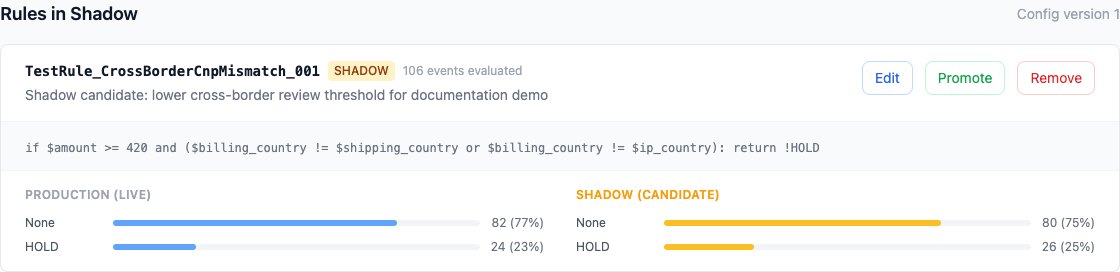
Open Shadow Rules in the sidebar to see:
- All rules currently deployed to shadow
- A summary of recent shadow outcomes per rule
- Per-rule Promote to Production and Remove actions
Current Shadow Config (API)
Returns the list of rules currently in shadow with their logic, description, and config version.
Outcome Comparison (API)
Returns per-rule outcome counts for shadow vs production, for the same events:
{
  "rules": [
    {
      "r_id": 12,
      "total": 4820,
      "shadow_outcomes": [
        {"outcome": "HOLD", "count": 612},
        {"outcome": "None", "count": 4208}
      ],
      "prod_outcomes": [
        {"outcome": "HOLD", "count": 391},
        {"outcome": "None", "count": 4429}
      ]
    }
  ]
}
None means the rule returned nothing (no condition matched). The comparison shows you the magnitude and direction of the change.
Raw Results (API)
curl "http://localhost:8888/api/v2/shadow/results?limit=100" \
  -H "Authorization: Bearer <access_token>"
Returns individual shadow evaluation records joined with event metadata (event ID, timestamp). Useful for drilling into specific events where shadow and production diverged.
Reading the Stats
The stats endpoint compares shadow and production outcomes for the same set of events. This means the sample is identical — every event that was evaluated while the shadow config was active.
What to look for:
- Direction: does the shadow rule fire more or less often than production? Is that what you expected?
- Magnitude: by how much? A rule tightening a threshold from 10,000 to 7,500 might produce a 30% increase in
HOLDdecisions or a 3% increase — these have very different operational implications. - Unexpected outcomes: if the shadow rule returns an outcome you didn't expect, or returns
Nonefor events you expected it to catch, investigate before promoting.
Shadow results are not automatically labeled. You can see outcome distributions, but not whether those outcomes would have been correct in ground-truth terms. If you have labeled data for the relevant time window, cross-reference manually.
Promote to Production
When shadow results match your intent, promote the rule.
From the UI
On the Shadow Rules page, click Promote to Production next to the rule.
From the API
curl -X POST http://localhost:8888/api/v2/rules/{rule_id}/shadow/promote \
  -H "Authorization: Bearer <access_token>"
Promoting is atomic:
- The shadow rule's logic and description are written to the rules table (with history snapshot).
- The production
RuleEngineConfigis updated to include the shadow version (with config history snapshot). - The rule is removed from the shadow config.
- Both the production and shadow executors are invalidated so the next evaluation picks up the change.
No downtime or redeployment required.
Remove from Shadow
If shadow results show the rule behaving differently than expected, or you've decided to change approach, remove it.
From the UI
On the Shadow Rules page, click Remove next to the rule.
From the API
curl -X DELETE http://localhost:8888/api/v2/rules/{rule_id}/shadow \
  -H "Authorization: Bearer <access_token>"
Removing clears the shadow config entry and its result history. The rules table and production config are unchanged. If you used the draft-logic path, the draft is discarded.
Permissions
Shadow deploy and remove actions require the MODIFY_RULE permission.
Promoting from shadow to production requires the PROMOTE_RULES permission.
Viewing the shadow config and results requires the VIEW_RULES permission.
Caveats
Best-effort evaluation: shadow evaluation errors are silenced to protect the main evaluation path. If the shadow rule references a field that is absent in a particular event payload, that event's shadow result is not stored. Check result counts against total event volume if you need to quantify coverage.
No caller impact: shadow results are never included in the POST /api/v2/evaluate response. Production outcomes are unaffected regardless of what the shadow rule returns.
Stats reset on re-deploy: deploying a new version of the same rule to shadow clears its result history. You start a fresh accumulation.
Time-to-signal: shadow results accumulate over time. The longer a rule has been in shadow, the more representative the outcome distribution. A rule that has been in shadow for two hours on low-traffic periods gives you less signal than one that has run through a full business day.
Next Steps
- Creating Rules — rule syntax, patterns, and testing
- Monitoring & Analytics — production outcome monitoring
- Analyst Guide — full analyst workflow including backtesting and labeling
- API Reference — complete endpoint map