AI-Assisted Rule Authoring in ezrules: Generate Transaction Monitoring Rules from Natural Language
Writing transaction-monitoring rules is usually a mix of policy thinking and syntax work.
An analyst knows the behavior they want to detect:
- large transfers from risky destinations
- activity from disposable email domains
- repeated proxy-heavy transactions from low-trust devices
But getting that intent into a valid rule still takes time:
- finding the right fields
- remembering list names
- using the correct outcome syntax
- checking whether the draft logic actually compiles
ezrules now adds AI-assisted rule authoring directly inside the existing rule editor so teams can move from natural-language intent to a reviewable draft faster.
What AI rule authoring does
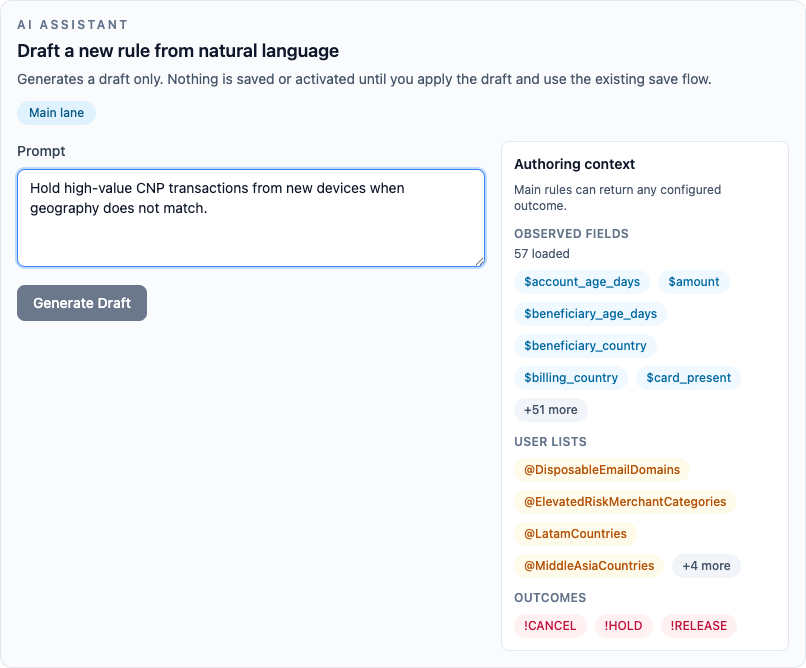
The AI assistant is built into the normal rule create and rule edit workflows.
A user can describe the rule they want in plain English, and ezrules will:
- generate a draft in native ezrules rule syntax
- validate the generated logic
- attempt bounded repair for obvious issues
- explain the generated rule line by line
- show a diff against the current rule when editing
- offer a manual backtest action for valid edit-mode drafts
- require an explicit copy step into the real editor before save
This is important: the assistant does not auto-save and does not auto-activate anything.
The generated output is a draft preview until the user explicitly copies it into the main rule editor.
Why this matters for fraud and compliance teams
Most rule authoring friction is not about business logic. It is about translation.
A fraud analyst might want to say:
Hold high-value wire transfers from newer accounts when the beneficiary is in a sanctioned country.
The system already knows:
- which fields have been observed
- which user lists exist
- which outcomes are configured
- whether the rule is in the main lane or allowlist lane
AI-assisted authoring closes the gap between those two layers.
Instead of starting from a blank editor, the analyst starts from a generated draft that already uses ezrules-native concepts such as:
$amount$customer.account.age_days@SanctionedCountries!HOLD
That shortens time-to-first-draft without creating a second rule language that has to be translated back into the engine.
The review flow is intentionally explicit
The safest part of the feature is not the generation. It is the review flow around generation.
The assistant now makes the generated draft easier to inspect before it affects the real rule body.
1. Validation and repair happen before the user copies anything
Generated rules are checked against the same validation path used by the rule API.
That means the preview can surface:
- syntax errors
- missing or invalid outcomes
- warnings about referenced fields
- lane-specific constraints
The assistant can also attempt bounded repair before handing the draft back to the user.
2. The draft is visually separated from the real editor
The generated rule appears in a dedicated preview block, not silently inside the actual editable rule body.
This avoids the common problem where an AI suggestion looks authoritative even though it has not been reviewed yet.
3. A diff shows exactly what changed
When editing an existing rule, the assistant can show a char-level diff against the current editor content.
That matters because many useful AI edits are small:
- adding one more condition
- changing one threshold
- swapping one outcome
Char-level diff makes those edits easier to inspect than a full-line replacement view.
4. A line-by-line explainer is available when needed
The assistant also produces a line-by-line explanation of the generated draft.
This is useful when a reviewer wants to understand:
- what each branch is doing
- which condition maps to which business idea
- whether the generated logic matches the original analyst request
5. Manual backtests show likely impact before save
When a valid draft is generated while editing an existing rule, ezrules shows a Run Backtest action under the proposed logic change.
The action uses the same Backtest Results section as the rest of the rule detail page. It compares the stored rule and proposed draft before the user copies or saves anything, and shows:
- outcome distribution deltas between the stored and proposed logic
- skipped-record counts and missing-field warnings
- label-aware precision, recall, and F1 when historical labels exist
This keeps the expensive comparison user-triggered while preserving the normal save, promote, rollout, and shadow workflows.
6. Copy into the main editor is a deliberate action
The preview becomes real rule content only when the user chooses:
Use Draft In Main Editor
Until then, the normal Save/Create actions are still tied to the main rule editor, not the AI preview.
That keeps the human-in-the-loop and makes the authoring step auditable and reviewable.
What context the assistant uses
AI rule authoring is not a generic chatbot prompt box. It uses ezrules-specific context from the organisation.
The current implementation can include:
- observed fields
- configured field types
- user lists
- configured outcomes
- lane constraints
- neutral outcome rules for allowlist behavior
- the current rule body and description when editing
That makes the generated output much more likely to fit the actual rule engine than a generic model prompt would.
OpenAI-backed settings in the product
ezrules also adds AI configuration to the Settings page.
An organisation can now:
- enable or disable AI rule authoring
- select the OpenAI provider
- choose the model
- manage the provider API key
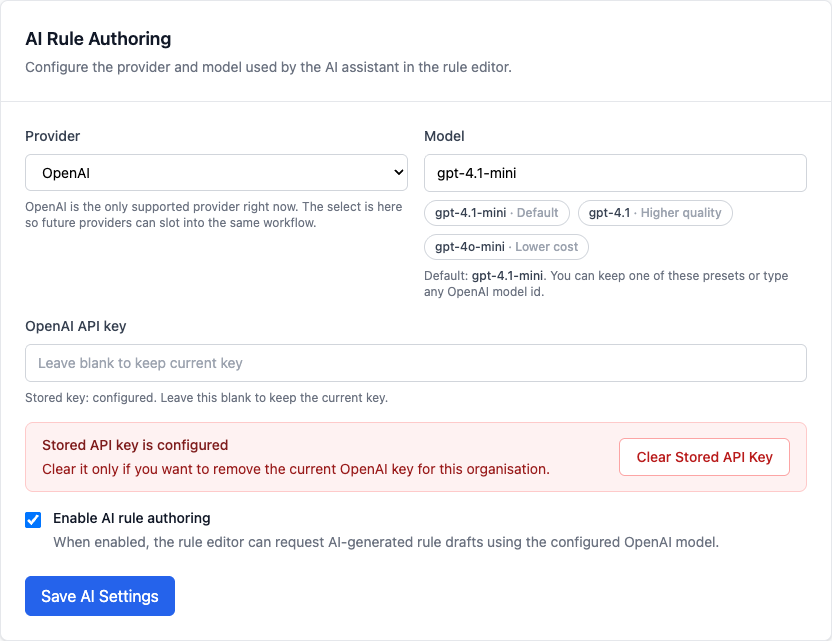
At the moment, the product UI intentionally supports OpenAI only.
That keeps the first release simple while preserving a backend shape that can support additional providers later.
A practical example
Imagine an existing rule:
An analyst may want to tighten it with one more requirement, such as email age.
Instead of manually editing and rechecking syntax, they can ask the assistant for that change and review:
- whether the threshold logic is still correct
- whether only the intended condition changed
- whether the new draft preserved the right outcome behavior
That is exactly the kind of small-but-risky authoring step where AI can help without replacing human judgment.
What this feature is not
AI rule authoring in ezrules is not:
- automatic promotion
- automatic activation
- a separate no-code rule engine
- a replacement for analyst review
It is a drafting accelerator on top of the existing expert editor.
That distinction matters. In transaction monitoring, the problem is rarely “how do we let the model decide?” It is usually “how do we get from intent to a reviewable draft faster without weakening controls?”
Final thought
The most useful AI features in compliance and fraud tooling are usually the ones that remove mechanical work while keeping responsibility clear.
AI-assisted rule authoring in ezrules does exactly that:
- faster rule drafting
- native engine syntax
- explicit validation
- visual review aids
- human acceptance before save
That is a much better fit for production transaction monitoring than a fully automatic rule-writing workflow.
Related docs: