Guide for Analysts
If your job is to review suspicious transactions, tune fraud rules, and explain why a decision was made, this page is for you.
As an analyst, you'll:
- Create and tune business rules to detect fraud or compliance violations
- Monitor outcomes and review flagged transactions
- Label transactions for performance measurement
- Analyze rule effectiveness and reduce false positives
- Build a repeatable workflow your team can trust
The Practical Workflow
Most analyst work in ezrules follows this loop:
- Create or update a rule.
- Make sure the outcome your rule returns exists (for example
HOLD). - Test with realistic events.
- Label results (
FRAUD,NORMAL,CHARGEBACK). - Check analytics for false positives and missed fraud.
- Backtest before promoting major rule changes.
- For higher-stakes changes, shadow deploy to validate on live traffic before promoting.
- If a new revision performs worse than expected, use Rule History to roll back to a known-good revision and create a replacement draft.
- If certain traffic should be treated as explicitly safe before normal checks, move that logic into the allowlist lane instead of relying on an ordinary
RELEASErule.
This process is simple, but doing it consistently is what improves model quality over time.
Write Rules That Are Easy To Operate
A rule returns a configured outcome with !OUTCOME syntax:
You will usually get better results by combining multiple signals:
risk_score = 0
if $amount > 5000:
    risk_score += 2
if $country in @high_risk_countries:
    risk_score += 3
if $account_age_days < 30:
    risk_score += 1

if risk_score >= 4:
    return !HOLD
Test With Realistic Events
For most analysts, the easiest way is to test directly in the UI:
- Open Rules and select your rule.
- In the right-side Test Rule panel, paste a JSON payload in Test JSON.
- Click Test Rule.
- Review the returned reason and rule outcome immediately.
If you need API-based testing for automation, see Automation Appendix below.
Label Transactions (This Is Where Quality Comes From)
For most analyst teams, labeling should be a UI workflow first. Use API labeling only for integrations or batch automation.
UI workflow (recommended)
- Open Labels.
- Confirm label names exist (for example
FRAUD,NORMAL,CHARGEBACK). - Upload rows like:
- Open Analytics and confirm labeled counts/trends update.
API-based labeling options are in Automation Appendix below.
Tip: consistent labeling standards are more important than perfect speed.
Measure Analyst Performance Metrics
False positive rate
NORMAL labels in triggered outcomes / total triggered events
False negative review
- Mark confirmed fraud as
FRAUD. - Check whether those events produced outcomes.
- Update rules for patterns that were missed.
Use Dashboard + Analytics Together
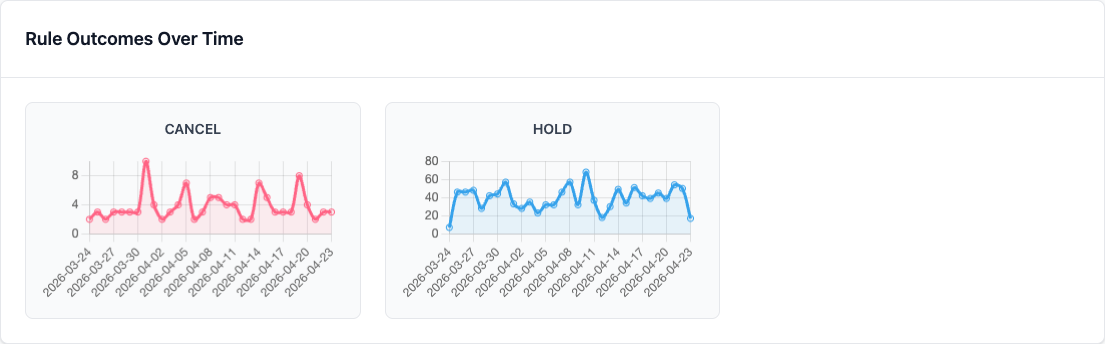
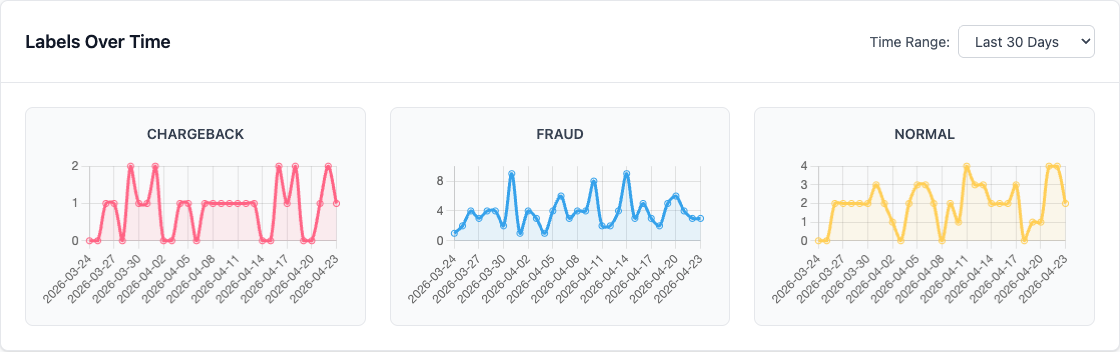
Use Dashboard and Analytics (sidebar label) together for full context:
- transaction volume trends
- outcome trends
- label distribution and label trends
Start with the 30-day view when you are looking for useful trend shape rather than just confirming that the latest events arrived.
Relevant endpoints:
GET /api/v2/analytics/transaction-volume?aggregation=30dGET /api/v2/analytics/outcomes-distribution?aggregation=30dGET /api/v2/analytics/labels-summaryGET /api/v2/analytics/labels-distribution?aggregation=30d
Best Practices
- Start conservative, then tighten thresholds with data.
- Label quickly and consistently with team-agreed definitions.
- Backtest for initial calibration on historical data; shadow deploy for observe-only validation or use a rollout when you need gradual live exposure before a full promote.
- If a change degrades outcomes, roll back from the rule history timeline instead of manually retyping old logic.
- Review trends on a fixed cadence (daily/weekly).
Recover From a Bad Revision
When a recent edit increases false positives or misses confirmed fraud:
- Open the affected rule.
- Click Visualize history.
- Find the last revision that behaved correctly.
- Use Roll back to revision ... to create a new draft from that historical version.
- Re-test, optionally shadow deploy, then promote when satisfied.
This keeps the audit trail intact. The problematic revision remains visible in history, and the rollback itself is recorded as a new change.
Common Rule Patterns
These patterns are good starting points for everyday analyst work.
Time-Based Rules
# Flag unusual transaction times
# Flag transactions between 2 AM and 5 AM
if 2 <= $hour <= 5:
    return !HOLD
User Behavior Rules
# Flag deviation from normal behavior

# Flag if 5x normal spending
if $amount > $user_avg_amount * 5:
    return !HOLD
List-Based Rules
# Check against blocklists
if $user_id in @blocked_users:
    return !CANCEL

# Check against allowlists (inverse)
if $user_id not in @trusted_users:
    return !HOLD  # Send for manual review
If a trusted list should bypass the rest of the decisioning flow entirely, that is a better fit for an Allowlist rule than for an inverse main rule.
Next Steps
- Creating Rules - Rule syntax and patterns
- Allowlist Rules - Use explicit safe-pass rules when trusted traffic should skip the main rule set
- Shadow Deployment - Validate rule changes on live traffic before promoting
- Rule Rollouts - Shift a candidate rule onto a stable percentage of live traffic
- Labels and Lists - Labels, lists, and outcomes in one workflow
- Monitoring & Analytics - Dashboard metrics
Automation Appendix
Use these API examples only when labeling/testing is integrated into another system.
Evaluate via API
curl -X POST http://localhost:8888/api/v2/evaluate \
  -H "Authorization: Bearer <access_token>" \
  -H "Content-Type: application/json" \
  -d '{
    "transaction_id": "txn_001",
    "effective_at": 1704801000,
    "event_data": {
      "amount": 15000,
      "user_id": "user_123"
    }
  }'
Review:
rule_resultsoutcome_countersoutcome_set
Mark one event via API
curl -X POST http://localhost:8888/api/v2/labels/mark-event \
  -H "Authorization: Bearer <access_token>" \
  -H "Content-Type: application/json" \
  -d '{
    "transaction_id": "txn_001",
    "label_name": "FRAUD"
  }'