Rule Lifecycle Management in ezrules: Draft, Promote, Pause, Roll Back, Archive with Audit Trail
Rule engines usually fail at one of two extremes:
- Every edit is live immediately, which is fast but risky.
- Every edit requires an external process, which is safe but slow.
ezrules now supports an explicit lifecycle so teams can move fast without losing control: draft -> active -> paused -> active or archived, with lifecycle events captured in the audit trail and rollback available when a historical revision needs to be restored as a new draft.
Why lifecycle controls matter
If a rule change can go live directly from an edit, then you can accidentally ship unreviewed logic. If a rule change requires manual coordination outside the system, then iteration slows down and people work around process.
The useful middle ground is to separate:
- rule authoring (
draft) - rule deployment (
active) - temporary operational disablement (
paused) - retirement (
archived)
This gives you cleaner change control and a clear operational state for every rule.
What is now stored per rule
Each rule now includes lifecycle metadata:
status:draft,active,paused, orarchivedeffective_from: when the active version became effectiveapproved_by: user id recorded when the current rule version was activated or reactivatedapproved_at: timestamp recorded when the current rule version was activated
There is no separate approval workflow. The approved_* field names are kept for API compatibility and refer to promote, resume, or auto-promote actions. The audit trail exposes lifecycle transitions as event-log rows: action, actor, timestamp, and status transition.
API behavior by lifecycle
The lifecycle is enforced by API behavior:
POST /api/v2/rulescreates adraftrulePUT /api/v2/rules/{id}saves edits asdraftand clears previous activation metadata by defaultPOST /api/v2/rules/{id}/rollbackrestores a historical revision's logic and description into a brand newdraftPOST /api/v2/rules/{id}/promotemovesdrafttoactiveand records the activation actor + timestampPOST /api/v2/rules/{id}/pausemovesactivetopausedwithout archiving the rule and requires a dedicated pause permissionPOST /api/v2/rules/{id}/resumemovespausedback toactivePOST /api/v2/rules/{id}/archivemoves a rule toarchivedDELETE /api/v2/rules/{id}deletes the rule (requiresDELETE_RULE)
Production evaluation config now includes only active rules.
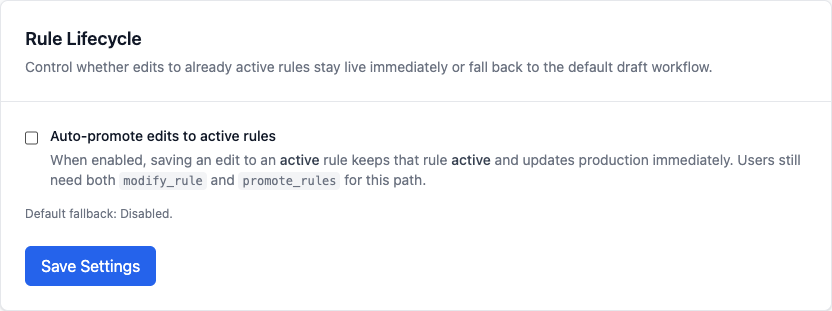
An org can opt into auto_promote_active_rule_updates through the runtime settings API or Settings → General. When that setting is enabled, editing an already active rule keeps it active and rewrites the production config immediately, but the caller still needs PROMOTE_RULES in addition to MODIFY_RULE.
flowchart LR
    A[Create rule] --> B[draft]
    B --> C[Edit rule]
    C --> B
    B --> D[Promote]
    D --> E[active]
    E --> F[Pause]
    F --> G[paused]
    G --> H[Resume]
    H --> E
    E --> I[Edit or detect issue]
    I --> J[Rollback to prior revision]
    J --> B
    E --> K[Archive]
    G --> K
    K --> L[archived]
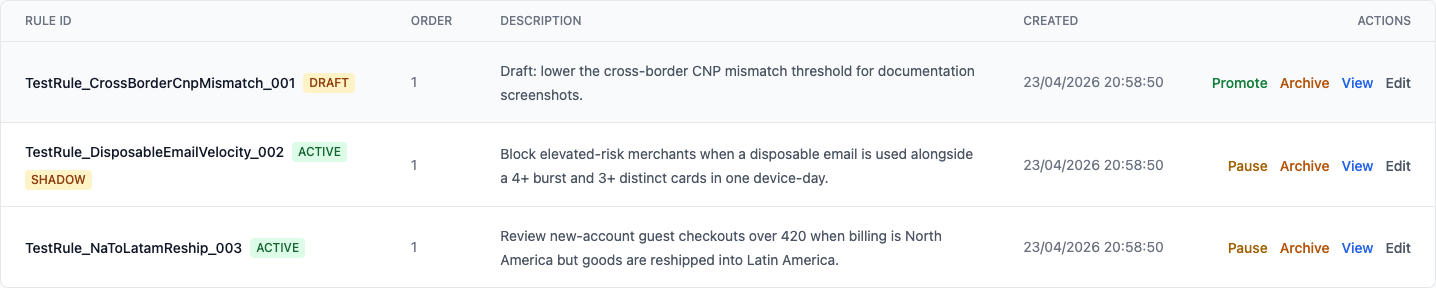
In the rule list, the lifecycle state stays visible next to the rule, alongside the actions that are available for that state.
Promotion is a first-class activation step
Promotion is no longer an implicit side effect of editing. It is an explicit operation that records:
- who activated the rule
- when it was activated
- when it became effective
That gives you a defensible trail for internal governance and external audits, while keeping authoring fast for rule editors.
Pause is not archive
Pausing is useful when a rule should stop affecting live outcomes right now, but you expect to reuse it.
pausedrules are excluded from production config- the rule can be resumed later without recreating it
- teams can distinguish "temporarily off" from "retired"
Use pause when you want a reversible operational stop. Use archive when the rule is retired.
Archive is not delete
Archiving is useful when you need to retire a rule but keep full context.
archivedrules are no longer active in production config- historical versions and metadata remain available
- teams can distinguish "no longer used" from "removed forever"
Use delete when you intentionally want permanent removal. Use archive when you want operational retirement with history intact.
Rollback is not history deletion
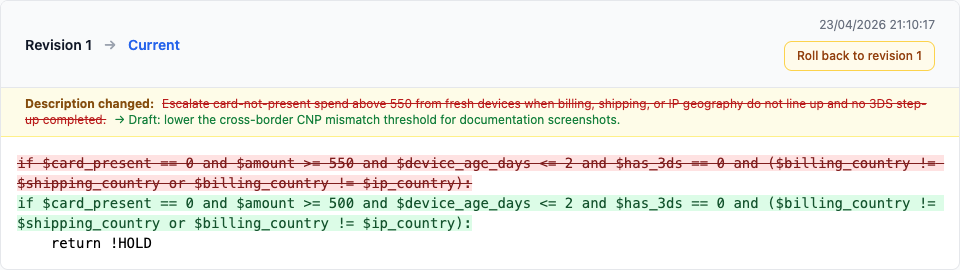
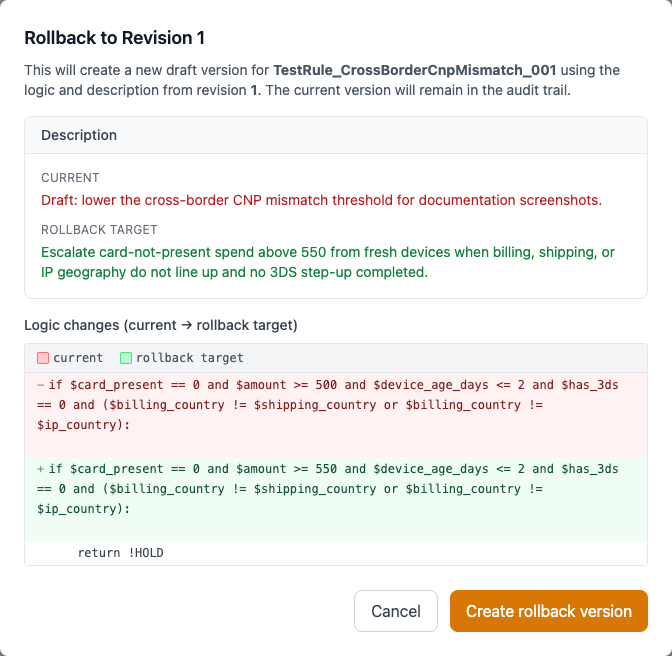
Rollback does not rewind the database in place and it does not remove newer revisions.
- the selected historical revision remains in history
- the current revision remains in history
- rollback creates a new
draftversion using the older logic and description - the rollback action itself is recorded in audit history
This is the safer operational model: you recover known-good logic quickly without destroying evidence of what changed.
Example: promote and archive
# Roll back rule 42 to revision 3 (creates a new draft)
curl -X POST http://localhost:8888/api/v2/rules/42/rollback \
  -H "Authorization: Bearer <access_token>" \
  -H "Content-Type: application/json" \
  -d '{"revision_number": 3}'

# Promote draft rule 42
curl -X POST http://localhost:8888/api/v2/rules/42/promote \
  -H "Authorization: Bearer <access_token>"

# Pause rule 42
curl -X POST http://localhost:8888/api/v2/rules/42/pause \
  -H "Authorization: Bearer <access_token>"

# Resume rule 42
curl -X POST http://localhost:8888/api/v2/rules/42/resume \
  -H "Authorization: Bearer <access_token>"

# Archive rule 42
curl -X POST http://localhost:8888/api/v2/rules/42/archive \
  -H "Authorization: Bearer <access_token>"
How this fits with shadow deployment
Lifecycle and shadow solve different concerns:
- Lifecycle controls whether a rule is draft, active, paused, or archived in production management flow.
- Shadow deployment validates candidate behavior on live traffic before promotion.
A practical sequence is:
- Edit rule in draft
- (Optional) deploy to shadow for live validation
- Roll back to a known-good revision if a newer draft or active version proves wrong
- Promote when ready to activate
- Archive when rule is retired
Net effect
You get a cleaner rule lifecycle without adding operational friction:
- safer releases through explicit promotion
- faster recovery through auditable rollback
- auditable activation trail
- clear operational state in UI and API
- predictable retirement path through archive
Related docs: