Rule Rollouts
Rule rollouts let you serve a candidate rule version to a stable percentage of live traffic while the current production version remains the control for the rest.
Use a rollout when you want a rule change to affect some real traffic immediately, but you still want gradual exposure and side-by-side comparison against the current live version.
When to Use Rollout vs Shadow
| Shadow Deployment | Rule Rollout | |
|---|---|---|
| Caller sees candidate outcome? | No | Yes, for the selected percentage |
| Traffic split | 0% candidate / 100% control | Configurable 1-100% candidate |
| Best use | Observe-only validation | Gradual live adoption |
| Risk level | Lower | Higher |
Shadow is for "watch only". Rollout is for "serve some live traffic now".
How Routing Works
Each rollout rule uses stable bucketing based on the event id plus the organisation and rule id.
- The same event always lands in the same bucket for a given rule.
- Increasing a rollout from
10%to20%adds traffic monotonically instead of reshuffling everything. - If the candidate rule errors on an event that was assigned to the candidate bucket, ezrules fails open to the control result for that event.
Start a Rollout
From the UI
- Open an active rule.
- Click Edit.
- Change the candidate logic or description.
- Click Start Rollout.
- Enter the rollout percentage.
If the rule already has a rollout, the same dialog updates the existing candidate and traffic percentage.
From the API
curl -X POST http://localhost:8888/api/v2/rules/{rule_id}/rollout \
  -H "Authorization: Bearer <access_token>" \
  -H "Content-Type: application/json" \
  -d '{
    "logic": "if $amount > 7500:\n    return !HOLD",
    "description": "Candidate logic",
    "traffic_percent": 20
  }'
Rollouts are allowed only for active rules.
Monitor a Rollout
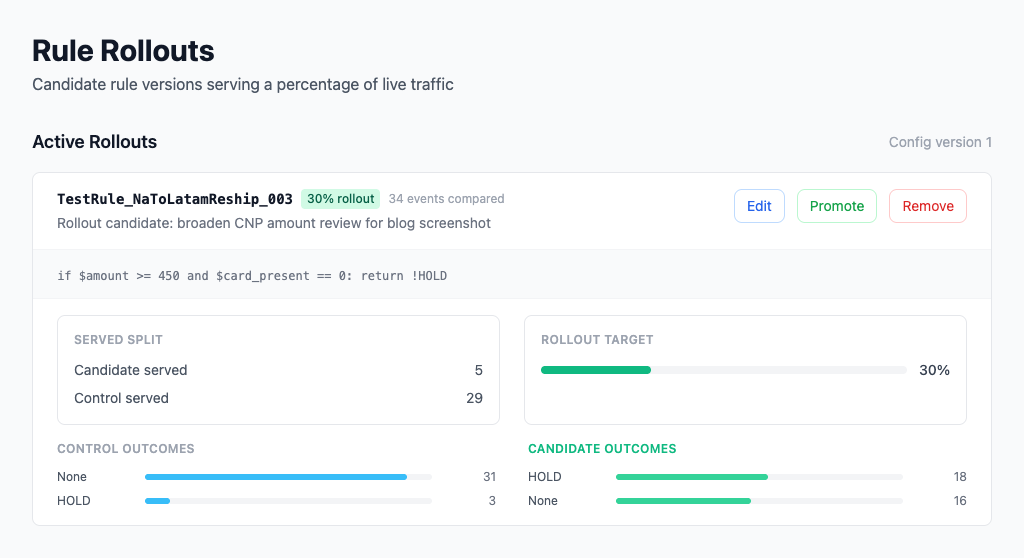
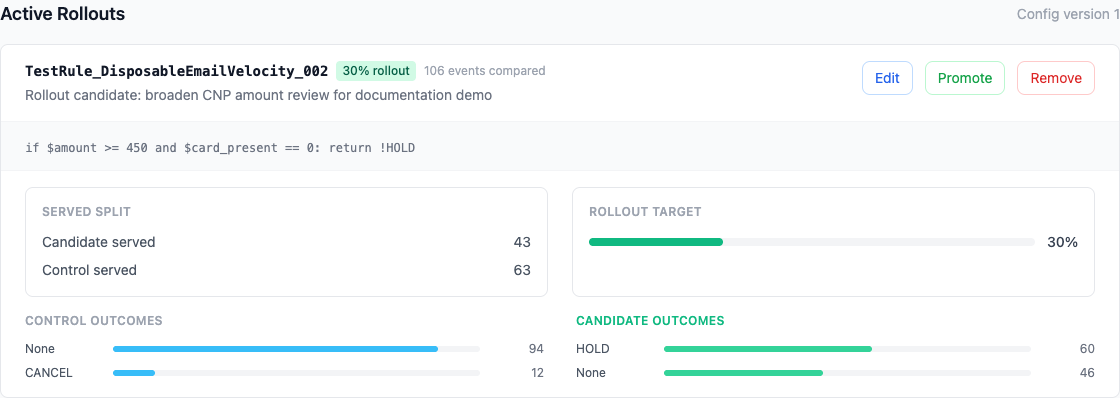
Open Rule Rollouts in the sidebar to see:
- the current rollout percentage
- how many events were served by control vs candidate
- control outcomes for the compared events
- candidate outcomes for the same events
API endpoints:
GET /api/v2/rolloutsGET /api/v2/rollouts/resultsGET /api/v2/rollouts/stats
Whenever you change the candidate logic or percentage, ezrules clears the rollout's accumulated comparison data so the stats always describe the current candidate only.
Promote or Remove
When the rollout looks good:
curl -X POST http://localhost:8888/api/v2/rules/{rule_id}/rollout/promote \
  -H "Authorization: Bearer <access_token>"
When you want to stop it:
curl -X DELETE http://localhost:8888/api/v2/rules/{rule_id}/rollout \
  -H "Authorization: Bearer <access_token>"
Promotion writes the candidate logic into the main rule record and production config, then removes the rollout.
Operational Notes
- A rule can be in shadow or rollout, not both.
- While a rollout or shadow deployment exists, direct edits to the base rule are blocked until you remove or promote the candidate deployment.
- Rollouts use
PROMOTE_RULESpermission for create, remove, and promote actions because they change live traffic behavior.