Labels, Lists, and Outcomes
Labels, lists, and outcomes work together:
- Outcomes are the decisions your rules return (
HOLD,RELEASE,CANCEL, and others you define). - Labels are the ground truth you apply later (
FRAUD,NORMAL,CHARGEBACK). - Lists are reusable groups referenced in rules (
@blocked_users,@trusted_users, etc.).
If you keep these three clean, your rules become much easier to operate and tune.
Transaction Labels
Labels tell you what actually happened after investigation. They are essential for measuring false positives and false negatives.
Common Label Catalog
ezrules does not auto-create labels for you. Create the names you actually use in your operation through the Labels page or the labels API.
Common examples:
FRAUDCHARGEBACKNORMAL
Labeling Methods
UI-first workflow (recommended for analysts)
- Open Labels.
- Ensure the label names you use operationally exist (
FRAUD,NORMAL,CHARGEBACK, etc.). - Upload
transaction_id,label_namerows from the CSV section on the page. - Confirm changes in Analytics.
API alternatives are listed in Automation Appendix below.
Create labels.csv with no header row and exactly two columns (transaction_id,label_name) when using CSV workflows.
Example:
Analytics
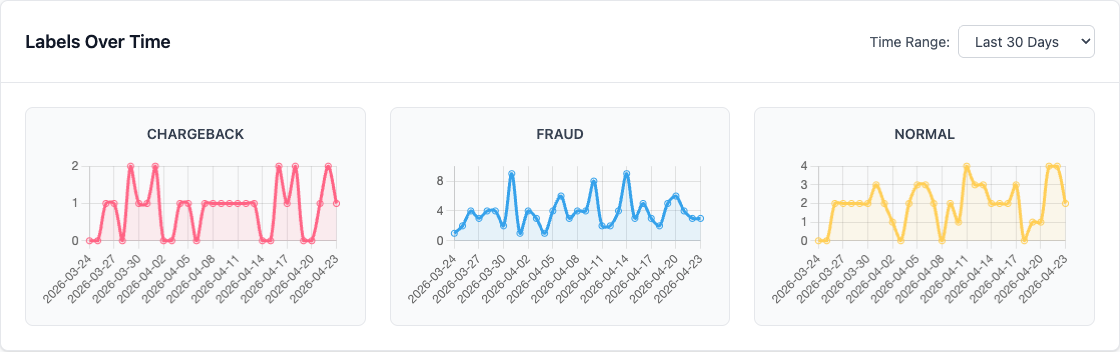
Open Analytics (sidebar label) to view:
- Total labeled events
- Label trends over time
- Aggregation windows (
1h,6h,12h,24h,30d)
For a useful first read, set the time range to Last 30 Days so sparse label uploads still form visible trend lines.
Outcomes
Outcomes are your operational decisions. Rules can only return values that exist in the allowed outcomes set.
Common outcomes include:
HOLDfor manual reviewRELEASEfor approve/allowCANCELfor decline/block
Why Outcomes Matter
- They standardize decisioning across rules.
- They make outcome trends measurable in analytics.
- They let teams align on operational actions.
Manage Outcomes in UI
- Open Outcomes.
- Add outcome names you want rules to return.
- Remove unused outcomes to keep the set clear.
- Open Settings and order outcomes under Outcome Resolution so conflicts resolve predictably.
When multiple rules return different outcomes for the same event, ezrules applies the Outcome Resolution hierarchy and stores the highest-severity resolved_outcome.
Example rule snippet:
Monitor Outcome Trends
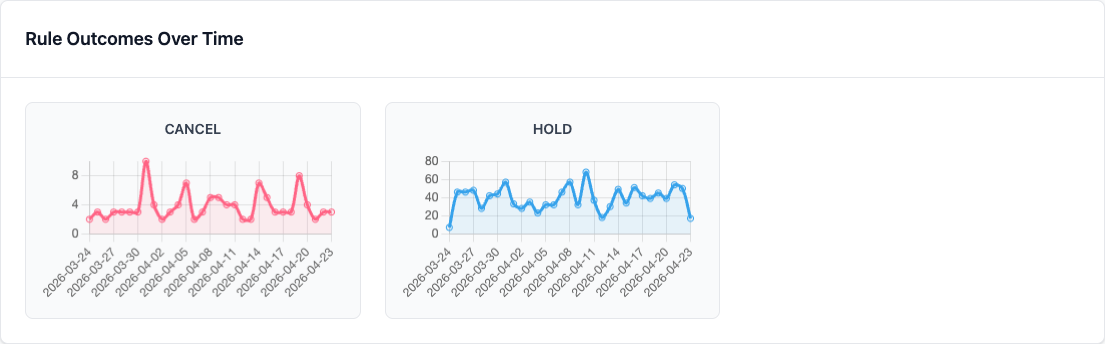
Use the Dashboard to track outcome volume over time. Start with the 30d aggregation when you want to see whether a decision is trending upward or fading out.
Key analytics endpoint:
GET /api/v2/analytics/outcomes-distribution?aggregation=30d
Supported aggregation values: 1h, 6h, 12h, 24h, 30d.
Outcome Best Practices
- Keep outcome names short and stable.
- Reuse existing outcomes where possible.
- Review the outcome hierarchy whenever you add a new operational decision.
- Remove unused outcomes during periodic cleanup.
- Validate your outcome set before major rule rollouts.
User Lists
User lists are reusable sets of values referenced from rules with @ListName.
Example:
Manage Lists in UI
- Open User Lists.
- Create a list.
- Add or remove entries.
Use clear names and keep list ownership explicit (for example, who updates the list and how often).
How They Work Together
Typical analyst loop:
- Rule evaluates event and returns an outcome (for example
HOLD). - Analyst reviews flagged transactions.
- Analyst labels reviewed transactions (
FRAUDorNORMAL). - Analytics shows whether current outcomes are too broad or too narrow.
- Analyst updates list membership and/or rule logic.
This loop is where most quality improvement happens.
API Endpoints
POST /api/v2/labels/mark-eventPOST /api/v2/labels/uploadGET /api/v2/labelsGET /api/v2/analytics/labels-summaryGET /api/v2/analytics/labels-distribution?aggregation=30dGET /api/v2/user-listsGET /api/v2/outcomesPOST /api/v2/outcomesDELETE /api/v2/outcomes/{outcome_name}
See OpenAPI docs at http://localhost:8888/docs for schemas and auth requirements.
Next Steps
- Analyst Guide - Analyst workflows
- Monitoring & Analytics - Dashboard and metrics
- API Reference - API overview
Automation Appendix
Use this section when labels/lists are managed by scripts or external systems.
Mark one event via API
curl -X POST http://localhost:8888/api/v2/labels/mark-event \
  -H "Authorization: Bearer <access_token>" \
  -H "Content-Type: application/json" \
  -d '{
    "transaction_id": "txn_123",
    "label_name": "FRAUD"
  }'